 新一代Kaldi
文章来源于新一代Kaldi,作者NGK编辑部
本文介绍如何使用新一代 Kaldi 中的 WebSocket 服务进行语音识别。
简介
本文介绍最近在sherpa[1]中新增的使用C++实现基于WebSocket的语音识别服务。只涉及设计思想、使用方法和测试结果。
具体的代码实现请参考如下链接:
https://github.com/k2-fsa/sherpa/tree/master/sherpa/cpp_api/websocket
注:实现上,我们选择websocketpp[2]和asio[3], 使用
异步编程的方式。
不依赖boost[4]。
不依赖
boost。不依赖
boost。
设计
具体架构如下图所示。
流式识别和非流式识别采用同一架构。
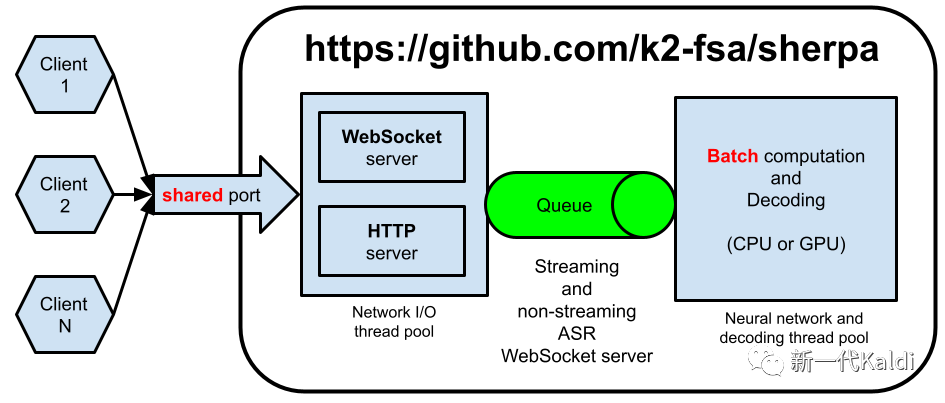
我们使用了两个线程池 (由asio管理):
(1)通信线程池
Network I/O thread pool:负责收发数据,处理与client的通信。(2)识别线程池
Neural network and decoding thread pool:负责神经网络计算和解码,即AM和decoder。
该架构支持同时有多个client发送请求的情况,且使用同一端口同时支持HTTP和WebSocket两种服务。
注:目前
HTTP服务只负责提供下述链接中的静态文件给客户端。https://github.com/k2-fsa/sherpa/tree/master/sherpa/bin/web
当收到client发送的数据时,我们首先会把它放入到一个队列里面,然后使用asio::post通知识别线程池, 由asio调度识别线程池里的线程进行处理。
当识别线程池里的线程处理队列里的请求时,如果发现有多个请求,会把这些请求 打包成一个batch,然后以batch的方式进行处理。用户可以用--max-batch-size命令行参数限制batch size的大小。当识别完成后,我们也使用asio::post, 通知通信线程把识别结果返回给客户端。
使用PyTorch进行底层计算,用户只需通过命令行参数--use-gpu=false或者--use-gpu=true来选择是使用CPU还是GPU。
注:目前只实现了对单个
GPU的支持。如果系统中有多个GPU, 默认使用GPU0。用户可以通过环境变量CUDA_VISIBLE_DEVICES指定使用哪个GPU。
该架构有如下优势:
-(1)省资源。使用固定大小的线程池。不是来一个请求,就创建一个新的线程。
-(2) 扩容方便。用户可以通过命令行参数--num-io-threads和--num-work-threads指定通信线程池和识别线程池的大小。依据不同的负载,使用不同的值。
-(3)支持batch处理。当有多个用户同时请求时,支持把这些请求打包成一个batch进行识别。
-(4)一键切换CPU或者GPU。用户通过命令行参数--use-gpu进行选择。
使用
本节介绍具体的使用方法。
编译
假设你已经安装好了PyTorch,k2[5]和kaldifeat[6]。编译sherpa的命令如下:
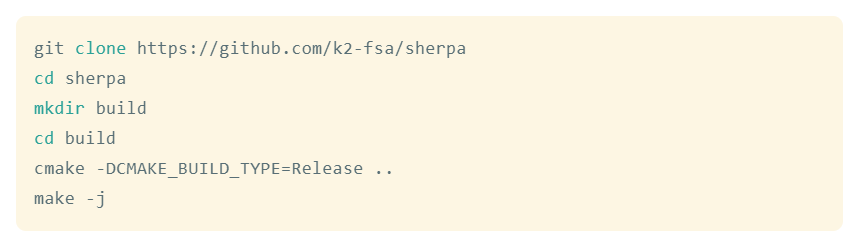
编译好后,生成如下文件:
build$ls-lh bin/*websocket*
-rwxr-xr-x 1 kuangfangjun root 12M Oct 30 10:35 bin/offline_websocket_client
-rwxr-xr-x 1 kuangfangjun root 15M Oct 30 10:35 bin/offline_websocket_server
-rwxr-xr-x 1 kuangfangjun root 12M Oct 30 10:35 bin/online_websocket_client
-rwxr-xr-x 1 kuangfangjun root 13M Oct 30 10:35 bin/online_websocket_client_from_microphone
-rwxr-xr-x 1 kuangfangjun root 16M Oct 30 10:35 bin/online_websocket_server
额,文件有点大。都大于 10 MB 了。
strip一下,文件大小如下:
buildbuildbuildbuild$ strip bin/*websocket*build$ls-lh bin/*websocket*-rwxr-xr-x 1 kuangfangjun root 435K Oct 30 10:36 bin/offline_websocket_client-rwxr-xr-x 1 kuangfangjun root 439K Oct 30 10:36 bin/offline_websocket_server-rwxr-xr-x 1 kuangfangjun root 431K Oct 30 10:36 bin/online_websocket_client-rwxr-xr-x 1 kuangfangjun root 439K Oct 30 10:36 bin/online_websocket_client_from_microphone-rwxr-xr-x 1 kuangfangjun root 427K Oct 30 10:36 bin/online_websocket_server
nbsp;strip bin/*websocket*
build$ls-lh bin/*websocket*
-rwxr-xr-x 1 kuangfangjun root 435K Oct 30 10:36 bin/offline_websocket_client
-rwxr-xr-x 1 kuangfangjun root 439K Oct 30 10:36 bin/offline_websocket_server
-rwxr-xr-x 1 kuangfangjun root 431K Oct 30 10:36 bin/online_websocket_client
-rwxr-xr-x 1 kuangfangjun root 439K Oct 30 10:36 bin/online_websocket_client_from_microphone
-rwxr-xr-x 1 kuangfangjun root 427K Oct 30 10:36 bin/online_websocket_server
nbsp;strip bin/*websocket*
build$ls-lh bin/*websocket*
-rwxr-xr-x 1 kuangfangjun root 435K Oct 30 10:36 bin/offline_websocket_client
-rwxr-xr-x 1 kuangfangjun root 439K Oct 30 10:36 bin/offline_websocket_server
-rwxr-xr-x 1 kuangfangjun root 431K Oct 30 10:36 bin/online_websocket_client
-rwxr-xr-x 1 kuangfangjun root 439K Oct 30 10:36 bin/online_websocket_client_from_microphone
-rwxr-xr-x 1 kuangfangjun root 427K Oct 30 10:36 bin/online_websocket_server
小于 500 KB, 还可以接受。
每一个生成的binary, 都支持使用--help查看使用帮助。在介绍它们的使用 方法之前,我们先下载预训练模型,以便测试。
预训练模型下载
中文非流式模型:
cd/path/to/sherpa
GIT_LFS_SKIP_SMUDGE=1 gitclonehttps://huggingface.co/luomingshuang/icefall_asr_wenetspeech_pruned_transducer_stateless2
cdicefall_asr_wenetspeech_pruned_transducer_stateless2
git lfs pull --include"exp/cpu_jit_epoch_10_avg_2_torch_1.7.1.pt"
英文非流式模型:
cd/path/to/sherpa
git lfs install
gitclonehttps://huggingface.co/csukuangfj/icefall-asr-librispeech-pruned-transducer-stateless3-2022-05-13
英文流式模型:
cd/path/to/sherpa
GIT_LFS_SKIP_SMUDGE=1 gitclonehttps://huggingface.co/Zengwei/icefall-asr-librispeech-conv-emformer-transducer-stateless2-2022-07-05
cdicefall-asr-librispeech-conv-emformer-transducer-stateless2-2022-07-05
git lfs pull --include"exp/cpu-jit-epoch-30-avg-10-torch-1.10.0.pt"
注:目前只实现了ConvEmformer[7]的流式模型。
基于 WebSocket 的流式识别
启动服务器:
cd/path/to/sherpa/build
./bin/online_websocket_server \
--nn-model=../icefall-asr-librispeech-conv-emformer-transducer-stateless2-2022-07-05/exp/cpu-jit-epoch-30-avg-10-torch-1.10.0.pt \
--tokens=../icefall-asr-librispeech-conv-emformer-transducer-stateless2-2022-07-05/data/lang_bpe_500/tokens.txt \
--port=6006 \
--use-gpu=false\
--num-io-threads=1 \
--num-work-threads=2
启动客户端 (识别单条音频)
cd/path/to/sherpa/build
./bin/online_websocket_client \
--server-ip=127.0.0.1 \
--server-port=6006 \
../icefall-asr-librispeech-conv-emformer-transducer-stateless2-2022-07-05/test_wavs/1089-134686-0001.wav
启动客户端 (麦克风录音,实时识别)
cd/path/to/sherpa/build
./bin/online_websocket_client_from_microphone \
--server-port=6006
\--server-ip=127.0.0.1
基于 WebSocket 的非流式识别
启动服务器:
./bin/offline_websocket_server \
--nn-model=../icefall_asr_wenetspeech_pruned_transducer_stateless2/exp/cpu_jit_epoch_10_avg_2_torch_1.7.1.pt \
--tokens=../icefall_asr_wenetspeech_pruned_transducer_stateless2/data/lang_char/tokens.txt \
--num-io-threads=2 \
--num-work-threads=5 \
--use-gpu=false
启动客户端:
./bin/offline_websocket_client \
--server-ip=127.0.0.1 \
--server-port=6006 \
../icefall_asr_wenetspeech_pruned_transducer_stateless2/test_wavs/DEV_T0000000000.wav
RTF 测试
下面我们测试非流式识别的 RTF。
• 测试集:LibriSpeech test-clean, 5.4 小时
我们分别使用GPU和CPU进行测试。
准备测试数据:
cd/path/to/sherpa
wget -q --no-check-certificate https://www.openslr.org/resources/12/test-clean.tar.gz
tar xf test-clean.tar.gz
rmtest-clean.tar.gz
ls-lh LibriSpeech
mkdir-p data/manifests
lhotse prepare librispeech -j 2 -p test-clean$PWD/LibriSpeech data/manifests
ls-lh data/manifests
lhotsecutsimple \
-r ./data/manifests/librispeech_recordings_test-clean.jsonl.gz \
-s ./data/manifests/librispeech_supervisions_test-clean.jsonl.gz \
test-clean.jsonl.gz
GPU 测试
启动服务器:
cd/path/to/sherpa/build
./bin/offline_websocket_server \
--nn-model=../icefall-asr-librispeech-pruned-transducer-stateless3-2022-05-13/exp/cpu_jit.pt \
--tokens=../icefall-asr-librispeech-pruned-transducer-stateless3-2022-05-13/data/lang_bpe_500/tokens.txt \
--num-io-threads=2 \
--num-work-threads=4 \
--max-batch-size=100 \
--use-gpu=true
注: 我们使用 32 GB 的V100GPU进行测试。
启动客户端:
cd/path/to/sherpa
time python3 ./sherpa/bin/pruned_transducer_statelessX/decode_manifest.py \
--server-addr 127.0.0.1 \
--server-port 6006 \
--manifest-filename ./test-clean.jsonl.gz \
--num-tasks 400
注:我们建立 400 个连接,同时发送数据。每个连接发送一条音频进行解码。收到 识别结果后,再发送下一条。
最终的RTF为0.0030,WER为 2.04。
注:RTF的计算方法为把所有数据解码完所需的时间,除以数据的总时长。
CPU 测试
我们使用 GitHub actions 提供的机器进行测试。机器配置[8]如下:
2-core CPU (x86_64)
7 GB of RAM
14 GB of SSD space
启动服务器:
cd/path/to/sherpa/build
./bin/offline_websocket_server \
--nn-model=../icefall-asr-librispeech-pruned-transducer-stateless3-2022-05-13/exp/cpu_jit.pt \
--tokens=../icefall-asr-librispeech-pruned-transducer-stateless3-2022-05-13/data/lang_bpe_500/tokens.txt \
--num-io-threads=1 \
--num-work-threads=2 \
--max-batch-size=1 \
--use-gpu=false
启动客户端:
cd/path/to/sherpa
time python3 ./sherpa/bin/pruned_transducer_statelessX/decode_manifest.py \
--server-addr 127.0.0.1 \
--server-port 6006 \
--manifest-filename ./test-clean.jsonl.gz \
--num-tasks 100
最终的RTF为0.0548,WER为 2.04。
详细结果,可以参考如下链接:
https://github.com/k2-fsa/sherpa/actions/runs/3349799955/jobs/5550137555
总结
本文介绍了sherpa中WebSocket语音识别服务的设计思想及使用方法。并在GPU和CPU上对RTF进行了测试。
注:如果有疑问,请关注新一代 Kaldi公众号,加入新一代 Kaldi 微信交流群进行讨论。
引用链接
[1]sherpa:http://github.com/k2-fsa/sherpa
[2]websocketpp:https://github.com/zaphoyd/websocketpp
[3]asio:https://github.com/chriskohlhoff/asio
[4]boost:https://www.boost.org/
[5]k2:http://github.com/k2-fsa/k2
[6]kaldifeat:https://github.com/csukuangfj/kaldifeat
[7]ConvEmformer:https://github.com/k2-fsa/icefall/tree/master/egs/librispeech/ASR/conv_emformer_transducer_stateless2
[8]机器配置:https://docs.github.com/en/actions/using-github-hosted-runners/about-github-hosted-runners#supported-runners-and-hardware-resources